SAILBook B10 Setup: Keyboard, Mouse and SIM
Source posted Mar 23, 2026 · Written up Nov 3, 2026
Why this video is useful
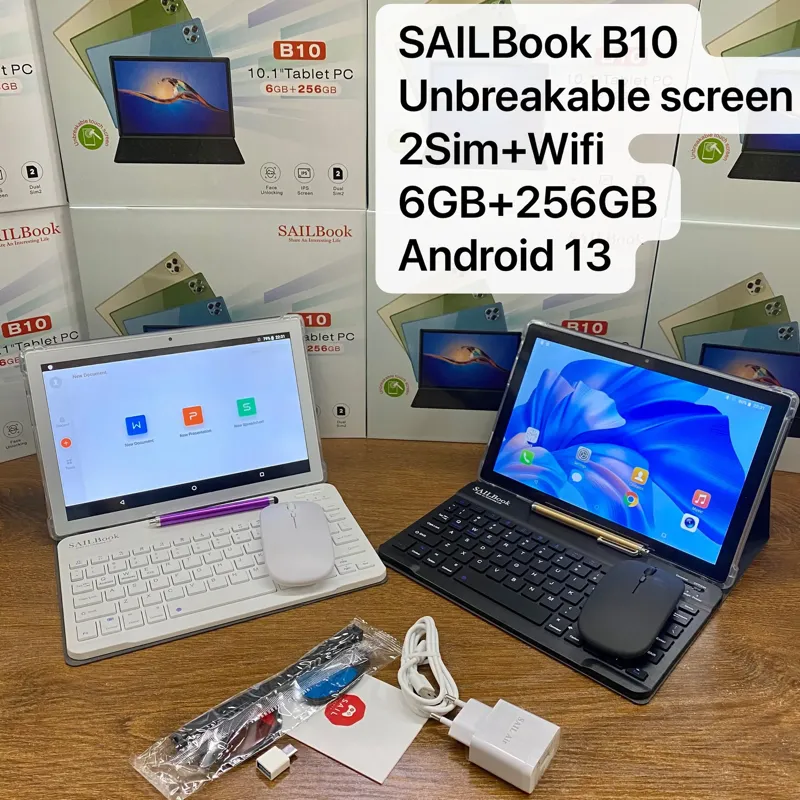
This seven-minute video is pitched at new users. Its description promises the unboxing, the keyboard connection and the creator's experience of using the tablet, and lists a leather pouch, chargers, an OTG adapter and a wireless mouse among the accessories.
Connecting the keyboard and mouse
The All Gadgets review films the same process. Both accessories pair over Bluetooth, and the order it follows is simple:
- Switch the keyboard on with its power button and watch for the indicator light.
- Turn on Bluetooth on the tablet and pair the keyboard.
- Fit a battery in the mouse, because the review's unit shipped without one.
- Set the mouse's switch to its Bluetooth position, search for devices on the tablet, then select the mouse from the list.
Using a SIM card
The B10 takes two SIMs, and that matters most where home Wi-Fi is uncommon. Insert a SIM, activate a data bundle with your carrier, and the tablet can get online without a router.
A spec to double-check
The video description lists a 5MP rear and 2MP front camera, while our listing gives 13MP rear and 5MP front. The reviews we read do not settle it, so check the camera on your batch if it matters to your customers.
The source against our current SAILBook B10 listing
Configurations change between batches and sellers, so confirm the exact one before you order.
| Spec | In the source | Our catalog |
|---|---|---|
| RAM | 6GB | 6GB |
| Storage | 256GB | 256GB |
| Battery | 5000mAh (approx.) | 5000mAh |
| Camera | 5MP rear / 2MP front | 5MP front / 13MP rear |
Other posts on this model
Opinions in the original post belong to its creator. GuanHong makes SAIL Air and SAILBook tablets, so read this summary with that in mind.